For years, enterprise automation has hit a wall when a process crosses applications that do not share a clean application programming interface (API) and work falls back to people pushing transactions forward one screen at a time. That is where computer-using agents (CUAs) are changing the equation.
RPA is now history, so close that last-mile automation gap with computer-using agents
Instead of waiting for every application to expose a modern interface, CUAs can interpret screens, navigate browsers and desktop apps, click, type, and complete multi-step work across the same visual layer employees use every day. The significance for enterprise automation leaders is not better screen scraping. It gives them a faster route to business outcomes, shorter transformation cycles, lower manual effort, and more automation coverage across the applications that still do not talk to each other.
Human middleware, which involves people toggling between applications, rekeying information, reconciling screens, and pushing work forward one click at a time, is the final frontier of the automation challenge. CUAs address this problem directly by interpreting screens, moving across applications, clicking buttons, entering data, and adapting to the visual context of the task (see Exhibit 1).
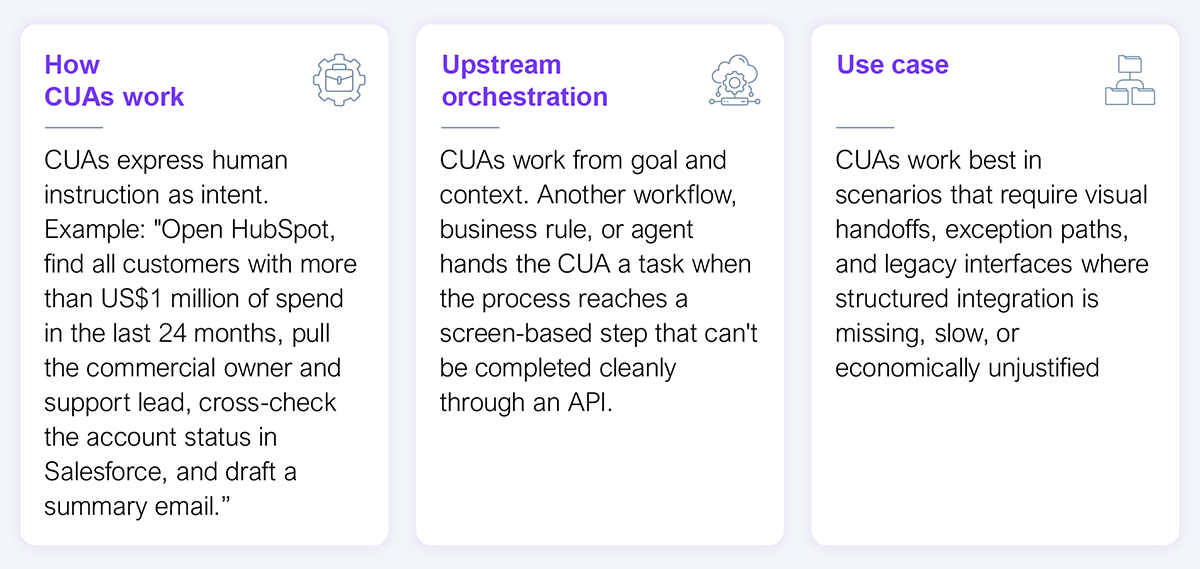
Source: HFS Research, 2026
Traditional robotic process automation (RPA) succeeded because it brought structure to repetitive work through detailed scripting against known selectors and screens. The challenge is that small interface changes could break entire processes and force automation teams into constant maintenance. CUAs promise a more adaptive and resilient model for solving this problem by interpreting screen context and adjusting layouts, fields, or workflows when they change. They still need prompts, policies, and workflow orchestration, but the interaction model is closer to assigning work to a capable operator than coding every click in advance.
CUAs do not replace APIs, integration platforms, or workflow systems. They extend them by creating a practical execution layer for the long tail of enterprise work that still depends on screens, clicks, context switching, and human judgment. The opportunity for CXOs is not just better task automation. It is a shift toward system orchestration across the full software estate, including the legacy, third-party, and black-box environments that have historically resisted automation.
Most enterprise automation remains siloed by system or function. Human workers, by contrast, operate horizontally. They read a message, check a claim in one system, validate details in another, consult a knowledge source, and then take action. Anthropic’s Cowork is the clearest example of a CUA and is framed as a system that executes multi-step knowledge work on the user’s behalf across their computer, local files, and applications.
The ability of CUAs to mimic that cross-system behavior in one coordinated flow is what sets them apart from other automation tools. That creates potential for a more horizontal digital workforce, one capable of stitching together fragmented work across the enterprise. In enterprise terms, it is a new path to automate work across the software estate that APIs, classic RPA, and manual operations have not fully solved. The enterprise question becomes less of “can the model click?” and more of “can it finish the work?”
Similarly, OpenAI (Operator), Microsoft (Copilot Cowork), and UiPath (Screenplay) are pushing in the same direction. The important signal is that CUAs are moving from isolated demos to productized capabilities for real enterprise work as models, tooling, orchestration patterns, and governance controls are advancing simultaneously.
CUAs can automate across third-party portals, partner ecosystems, government interfaces, and legacy applications without waiting for a full integration program or custom API build. They promise a more adaptive and resilient model for solving the last-mile RPA problem by interpreting screen context and adjusting layouts, fields, or workflows when they change. For automation leaders, that means:
It is clear that the autonomous enterprise will be built through a coordinated workforce of humans and agents operating across the full application estate, including the environments that were never designed to integrate cleanly. The next phase of enterprise transformation will not come only from better APIs, but from orchestrating work across the visual layers where key processes still run.
However, there are no standardized click-through processes, which is precisely why RPA has failed in these scenarios. Success in real-life applications will depend on how trainable the CUA is and how reliably and transparently it can bring coordinated execution across many apps. That is why a pragmatic approach to experimentation and scaling is critical.
CUAs should be used selectively for the visual steps that the rest of the automation stack can’t reach. Start with workflows where employees spend a disproportionate amount of time moving data between systems that don’t talk to each other. Claims operations, order management, revenue-cycle processes, finance operations, field service coordination, compliance checks, and service desk workflows are obvious candidates. The ideal pilot is not the flashiest use case; it is the one with fragmented interfaces, clear operational pain, and measurable manual effort.
The next step is to build human-in-the-loop oversight into the design as supervised autonomy, which lets the agent gather context, navigate systems, and prepare actions while routing high-stakes decisions or final approvals to a human. This captures much of the efficiency benefit while controlling operational risk.
More importantly, treat CUA adoption as how work gets executed across humans, applications, and agents. Organizations that move first with discipline will not just automate tasks faster. They will redesign how operational work flows across the full software stack.
Register now for immediate access of HFS' research, data and forward looking trends.
Get StartedIf you don't have an account, Register here |
Register now for immediate access of HFS' research, data and forward looking trends.
Get Started