
Microsoft recently announced the extension of Power Platform with robotic process automation (RPA) capabilities in Power Automate. So, business users have another toolkit at their disposal for process automation, and this one is embedded right into Microsoft platforms.
Power Automate sits within Microsoft’s Power Platform. It is a rebrand of the automated workflow feature, Flow and it includes new functionality too. UI flows, billed as RPA capabilities, is to be released into general availability in H1 2020. Let’s scratch the surface here to see what lies beneath the initial announcement (in public preview) and what is coming soon.
Power Platform is a low-code platform with all the requisite markers; it’s designed to be shareable, accessible, and easy for non-developers to use. Also, every component of Power Platform has a pro tool for developers, so what’s built in Power Platform can be further built on in the Azure framework by developers writing additional code.
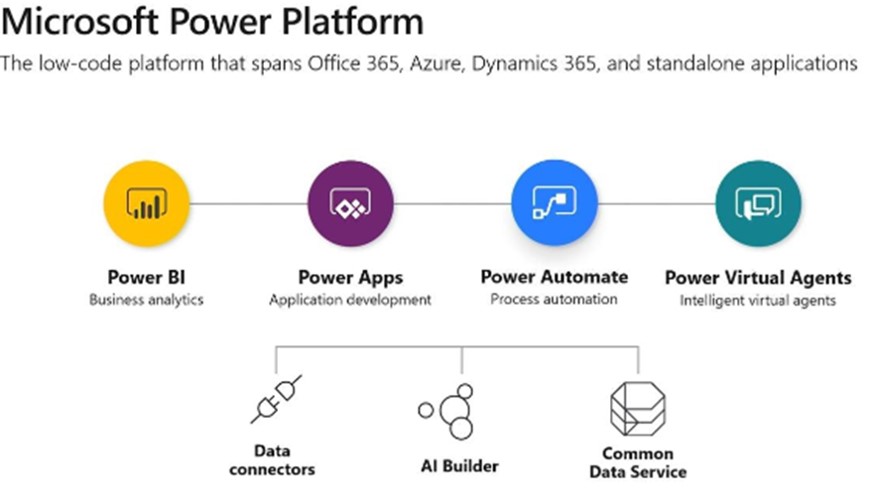
Power Platform before its expansion comprised
This is evolving, as depicted in Exhibit 1.
Exhibit 1: Power Automate is one of the connected siblings in the Power Platform product family
Source: Microsoft, 2019
Power Platform has “the prevention of chaotic application sprawl” top of mind, and Microsoft views low-code as “as disruptive to the development environment as the public cloud infrastructure providers were a decade ago.” One thing that’s key in Microsoft’s approach is that it centralizes governance and policy enforcement; it puts guardrails in place for power users and citizen developers to proceed and progress with analytics, application development, process automation, and intelligent virtual agents with appropriate governance and security according to their user-specific roles, permissions, and privileges.
Microsoft is taking the updated Power Platform to market with a series of Power Platform user-hero stories. These include a Heathrow airport security guard who shared his Power Apps creations (digitizing paper-based processes) with his co-workers in security, changing the way they worked with processes from the ground up. And Schlumberger publishes flows internally, for shared usage, with 500+ automated steps (keystrokes and mouse clicks), saving workers from manual steps.
For narrative completeness, recent announcements show Power Virtual Agents (chatbots and digital assistants) newly housed under the umbrella of Power Platform.
Power Automate is a cloud-native SaaS process and workflow designer. Flow’s value was in API based automation with connectors. RPA is an addition; the visual design experience of Flow, with triggers, steps, branching, and debugging, is now extended to user interface (UI) based automation—especially useful for green screen or custom-built legacy applications. New in UI Flows is a recorder that records different steps (mouse clicks and keystrokes). Users can edit automated flows in the browser with issue diagnosis and error management capabilities.
The core workflow management is cloud-native (true SaaS). To access legacy on-premises, you use gateway and edge capabilities. There is native integration with Microsoft 365, Dynamics 365, Azure, and the rest of its Power Platform siblings. More than 300 pre-built connectors span connection points both within the broader Microsoft portfolio of products and beyond, just a few of which are: Twitter, Instagram, Salesforce, DocuSign, Envoy, Flic, and Smarp. Now, more than 25 billion Power Automate (based on its predecessor Flow) steps run each day.
Cognitive capabilities to ingest unstructured document data in digital paper and forms (pdf, jpg, and png files) are not inherent, but AI builder in Power Automate and Power Apps supports template-based models and model building (with additional capacity purchase) for invoice processing, form processing, prediction, object detection, and text classification.
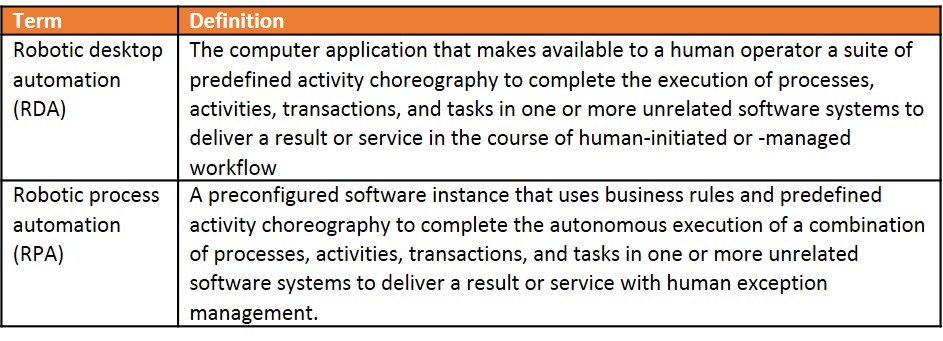
Terminology is used and abused in RPA circles. HFS leverages what we believe to be the industry’s best definition effort to date —the Institute of Electrical and Electronics Engineers’ (IEEE) terminology.
Exhibit 2: Extracts from the IEEE Corporate Advisory Group (CAG) terminology definitions
Source: IEEE Std 2755TM-2017, IEEE Guide for Terms and Concepts in Intelligent Process Automation
Many of (even the biggest) RPA vendors’ offerings are more robotic desktop automation (RDA) at heart. For sure, there is attended RDA at play in Microsoft’s Power Automate proposition through the UI-based automation. The publicly available preview supports flows running on user desktops, but the purist’s RPA—as in Blue Prism’s (coiner of the phrase, with HFS) unattended automation—is not present in Power Automate. Yet.
But, it’s early days. Power Automate will launch formally in H1 2020, and some features are still cooking. Microsoft intends to encompass unattended RPA for virtual machines (VMs) in the cloud and large pools of machines sooner rather than later. One of the features in preview is an orchestration component to support the management of unattended automation. A management farm (of many machines) is slated for general availability in the H1 2020 launch, with queue management, distribution, and orchestration. Additionally, there will be support for other types of apps; for example, right now, both Win32 apps and web apps are supported, and old school Java and legacy terminal apps are coming soon. There will be enhancements in design surface building reporting; work is in progress to address limitations in script-building capabilities, such as advanced expressions or conditional logic, which will be built into the design experience. HFS believes there are one or two more rabbits in the hat, too.
UI Flows is closest to the attended desktop variant of RPA, like UiPath or Automation Anywhere’s core attended offerings. Since UiPath’s inception (UiPath founder Daniels Dines’ once worked at Microsoft), there has been much speculation that Microsoft would be the start-up’s ultimate exit point by way of acquisition. But, Microsoft looks like it’s drawing a line in the sand on that conjecture once and for all. It’s going its own route with process automation, and it is committed to working with other RPA vendors agnostically through connectors. In fairness, on the co-opetition front, Microsoft is in the habit of collaborating with competing enterprise software vendors such as SAP. SAP is co-sold on Azure, despite the obvious competition with Dynamics365.
Microsoft, arguably, doesn’t need to buy an RPA company to do what it can do by itself. RPA products admittedly can do more today, but apparently not enough more to merit expensive acquisition. Microsoft’s ecosystem, including other RPA products, can be accessed through connection points as needed.
Power Apps enables business users to build new low-code capabilities via apps. Users can create applications on other applications and data sources. Automated workflows can be shared across teams (or further). Sharing an app is designed to be as easy as sharing a document in a few clicks, with the safeguard that subsequent users might need to add authentication credentials so that no underlying data or application protocols are compromised. Microsoft’s Common Data Model (CDM) is a shared data schema; it is a set of over 200 standard business entities in a common data model that ensures consistency across apps. It can be extended with custom fields if needed. So, Power Apps can solve some of the problems that RPA tackles, albeit in a different, low-code way.
The short and simple answer is: No, it’s a premium subscription. But some Power Automate capabilities are included (for free) in O365—Flow (as it was), a light version with limited functionality.
O365 subscriptions changed in October 2019; Azure, SQL, and Dynamics connectors were moved out of the O365 subscription. You now need premium Power Apps or Power Automate subscriptions.
Exhibit 3: Start small, then there’s an option to shift to an alternative pricing mechanism

Source: Microsoft, 2019
This pricing structure aims to support experimentation, then scaling up as required. Teams, departments, or the entire organization can use individual flows from the cloud with per-flow pricing. This is a noticeable contrast to the bot-for-every-worker approach that results in many license fees for many bots.
Dynamics 365 is one of many enterprise platforms that Power Platform can access through connectors, much like Oracle or Salesforce. If you are a Dynamics 365 customer, a limited subset of Power Automate capabilities is included and embedded, including building workflows and creating custom views, provided you stay within the context of Dynamics 365. If you need to create a workflow outside the app, such as for employee onboarding with other enterprise applications, too, then you need the premium subscription. Similarly, there is a SharePoint connector, or another shared file repository could be used.
The Bottom Line: We have been waiting for the large enterprise platform players to step up to RPA because their gigantic installed bases have a visible appetite for a range of process automation solutions. This is a decisive move forward by Microsoft, but it needs to be further baked to go beyond attended RDA into unattended RPA.
The net effect is similar to SAP’s acquisition of Contextor combined with in-house development of RPA capability; clients have the option to automate from within a product family rather than from outside.
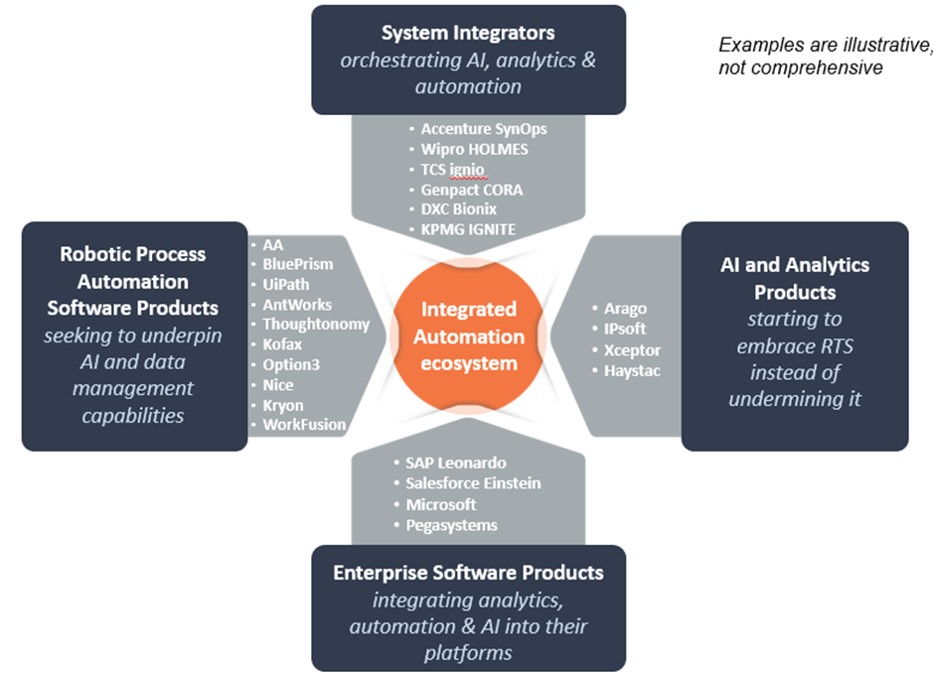
Exhibit 4: HFS’ integrated automation ecosystem shows automation possibilities emerging from four angles from services and software players
Source: HFS, 2019
As it is embedded in the portfolio of Microsoft products, it is easy to access Power Automate buttons in-app to start automating tasks. However, because Power Platform operates at the data object level, it is potentially relevant for Power Platform users across other enterprise platforms, too (remember the connectors), even where there are not many other MS products in the mix. It allows data to flow as data, with context and definition (and therefore consistency), within the construct of Microsoft’s CDM or other common objects. UI Flows, as it stands now, is essentially a screen scraping tool for legacy web, Windows, and terminal applications. As such, it does not guarantee the benefits of context unless captured data is mapped to common objects.
Is Microsoft’s approach better than other approaches to RPA that we see? Beauty is in the eye of the beholder, or maybe the citizen developer. There is a clear market need for technology so business users can get their repetitive, routine, rules-based work done. Microsoft is very clearly not advocating that its RPA be used as a substitute for deeper, mission-critical integration that is better suited to IT’s prioritization and roadmaps. Rather, the product fit here is with the long, long tail of messy and cumbersome processes that slow users down and could be automated with scripted flows. Microsoft has some catching up to do to get its capabilities up to the level of the established RPA players. Planned product enhancements suggest catching up won’t be too far out. Its established user base in the hundreds of thousands and millions (with a grand total across the portfolio topping a billion) will be the ultimate decision-makers. The existing footprint of RPA vendors looks somewhat pale in comparison.
Register now for immediate access of HFS' research, data and forward looking trends.
Get StartedIf you don't have an account, Register here |
With the exception of our Horizons reports, most of our research is available for free on our website. Sign up for a free account and start realizing the power of insights now.
Our premium subscription gives enterprise clients access to our complete library of proprietary research, direct access to our industry analysts, and other benefits.
Contact us at [email protected] for more information on premium access.

